
Fiber vs. Cable Internet: Understanding the Real Differences

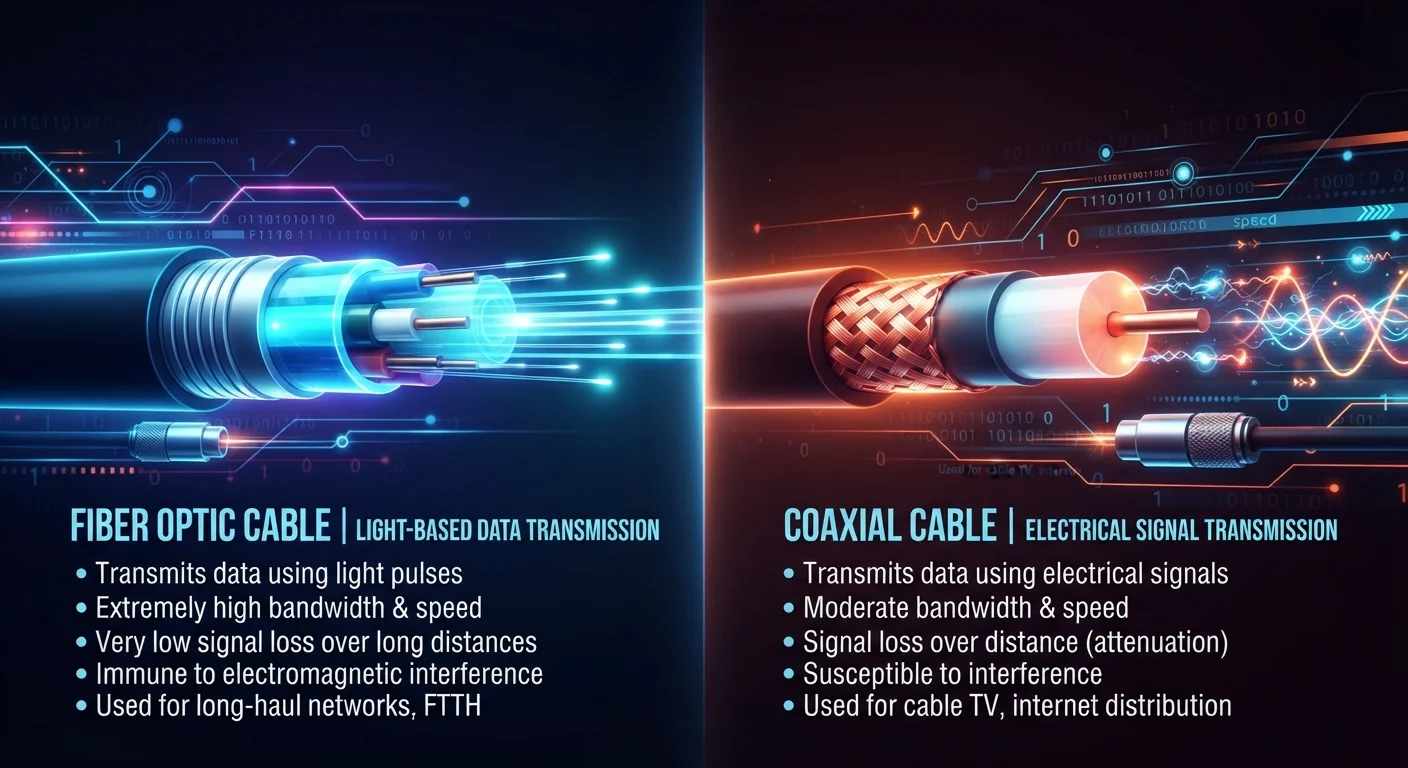
Photo: TargetReads.com | Explore Engaging Reads editorial
Key Takeaways
- Fiber transmits data using light through glass strands; cable uses electrical signals through coaxial copper lines.
- Fiber generally offers symmetrical upload and download speeds; cable plans typically favor download over upload.
- Cable internet is far more widely available across the U.S. than fiber, which is still expanding.
- Fiber is typically less susceptible to network congestion during peak hours than cable.
- Your actual experience depends on your household's usage patterns, not just the technology type.
The Technology Behind Each Connection
The most important difference between fiber and cable internet isn't speed — it's the physical medium carrying your data. Understanding this distinction helps explain every other performance difference.
Fiber internet uses thin strands of glass or plastic to transmit data as pulses of light. Because light travels with virtually no electrical resistance and isn't subject to electromagnetic interference, fiber signals degrade very little over long distances. This is why fiber connections are known for consistency.
Cable internet uses coaxial cable — the same type of line that delivers cable television — to send data as electrical signals. This infrastructure is already installed in a large portion of U.S. homes, which is why cable internet is so widely available. However, electrical signals are more susceptible to interference and signal degradation than light-based transmission.
For a broader look at how these and other connection types work, see our guide to home internet connection types.
| Criterion | Fiber Internet | Cable Internet |
|---|---|---|
| Signal medium | Light through glass/plastic strands | Electrical signal through coaxial copper |
| Speed symmetry | Typically symmetrical (equal up/down) | Usually asymmetrical (download >> upload) |
| Susceptibility to congestion | Lower — dedicated or point-to-point | Higher — shared neighborhood bandwidth |
| Signal interference | Minimal — not affected by electricity | Can be affected by electrical interference |
| U.S. availability | Growing but limited — urban/suburban focus | Widely available across most U.S. markets |
| Infrastructure age | Newer — requires dedicated installation | Established — often uses existing cable TV lines |
Speed, Symmetry, and What It Means for You
When internet providers advertise speeds, they list both download and upload rates. These two numbers matter differently depending on how you use the internet.
Most cable plans are asymmetrical — download speeds are much higher than upload speeds. For example, a plan might offer 500 Mbps down but only 20 Mbps up. That works fine for streaming and browsing, which are primarily download activities. But it becomes a bottleneck when you're video conferencing, backing up files to the cloud, or sharing large media.
Fiber plans are typically symmetrical, meaning upload and download speeds are equal or nearly so. This is a meaningful advantage for households with multiple users doing upload-intensive tasks simultaneously.
It's worth noting that advertised speeds aren't guaranteed — actual performance varies based on network load, your router, and how many devices are connected. Our article on how bandwidth is shared across devices explains this in practical terms. If you're unsure whether your current plan is the bottleneck, check these factors at home first before assuming you need to upgrade.
~43%
U.S. homes with fiber internet access
According to the FCC's 2023 Broadband Data Collection, fiber-to-the-premises availability has expanded but still trails cable coverage nationally.
10–20x
Typical upload speed gap on cable plans
Many standard cable plans offer upload speeds that are a fraction of advertised download speeds, a ratio that affects cloud-dependent and video tasks.
Reliability, Congestion, and Availability
Cable internet uses a shared network architecture in most neighborhoods. That means the bandwidth available to your home is pooled with nearby subscribers. During peak hours — typically evenings — you may notice speeds dip as more people in your area get online simultaneously. This is a known limitation of the cable model, though modern cable infrastructure (especially systems using the DOCSIS 3.1 standard) has made significant improvements.
Fiber connections are generally point-to-point or use dedicated segments, making them less vulnerable to neighborhood congestion. The signal is also unaffected by electrical interference from appliances or wiring, which contributes to fiber's reputation for consistency.
That said, availability is a real constraint. Fiber infrastructure requires significant installation investment, and as of recent years, it remains concentrated in urban and suburban markets. Cable, by contrast, covers a much larger share of U.S. households. If you're experiencing speed issues and want to rule out home-level causes first, our structured troubleshooting guide is a useful starting point.
DOCSIS 3.1 and the Cable Upgrade Path
Making the Right Choice for Your Household
Neither fiber nor cable is universally superior — the right choice depends on your household's actual usage patterns and what's available at your address.
If fiber is available and your household includes remote workers, regular video callers, or multiple heavy users, it's worth considering for its symmetrical speeds and lower congestion sensitivity. If cable is your only option, it can still deliver a strong experience for most everyday tasks — streaming, browsing, gaming with a wired connection — especially on modern cable infrastructure.
Before making any decision, understand what speeds you actually need. Our guide on internet speed myths is a useful reality check, and our breakdown of download vs. upload speed can help you identify which metric matters most for your specific use cases.
Technology type is just one variable. Your router quality, home wiring, and how devices connect (wired vs. Wi-Fi) also shape the experience you actually get day to day.
The content on this site is for informational purposes only and is not a substitute for professional advice. Always consult a qualified professional for guidance specific to your situation.