
Internet & Connectivity

Router Placement Errors That Quietly Hurt Your Wi-Fi Performance

Router Placement Errors That Quietly Hurt Your Wi-Fi Performance

Photo: TargetReads.com | Explore Engaging Reads editorial

Where you put your router matters more than most people realize. These common placement mistakes weaken signal strength throughout the home.

Key Takeaways

  • Router placement affects signal strength throughout your home more than most hardware upgrades can.
  • Physical obstacles like walls, appliances, and furniture absorb or deflect wireless signals significantly.
  • Central, elevated, open-air placement consistently outperforms corner or enclosed locations.
  • Interference from other electronics can degrade Wi-Fi performance even when signal strength appears adequate.
  • Simple repositioning is often the first fix to try before investing in new networking equipment.

Why Router Location Is a Performance Variable, Not an Afterthought

Most people treat router placement as a one-time logistics decision — wherever the cable reaches, that's where it goes. In practice, physical placement is one of the most impactful variables in your home network's performance, and it's entirely free to fix.

Wi-Fi signals are radio waves. They pass through some materials, reflect off others, and get absorbed by still others. Every wall, floor, appliance, and piece of furniture your signal has to negotiate reduces the strength available to your devices. Signal drops in specific rooms are rarely random — they follow predictable physical patterns that placement directly influences.

Understanding the mistakes below can help you diagnose sluggish connections, buffering video, and frustrating dead zones without spending a dollar on new hardware.

1

Placing the router in a corner of the home, usually wherever the modem or coax outlet happens to be.

Why it happens: Most people simply plug the router in near the entry point of their internet service line and never move it. Convenience drives the decision, not coverage planning.
How to avoid: Think of your router's signal as radiating outward in all directions. A corner location wastes a large portion of that signal into exterior walls. Aim for the most central room in the home — even a long cable run or a powerline adapter to shift the router's position pays off in whole-home coverage.
2

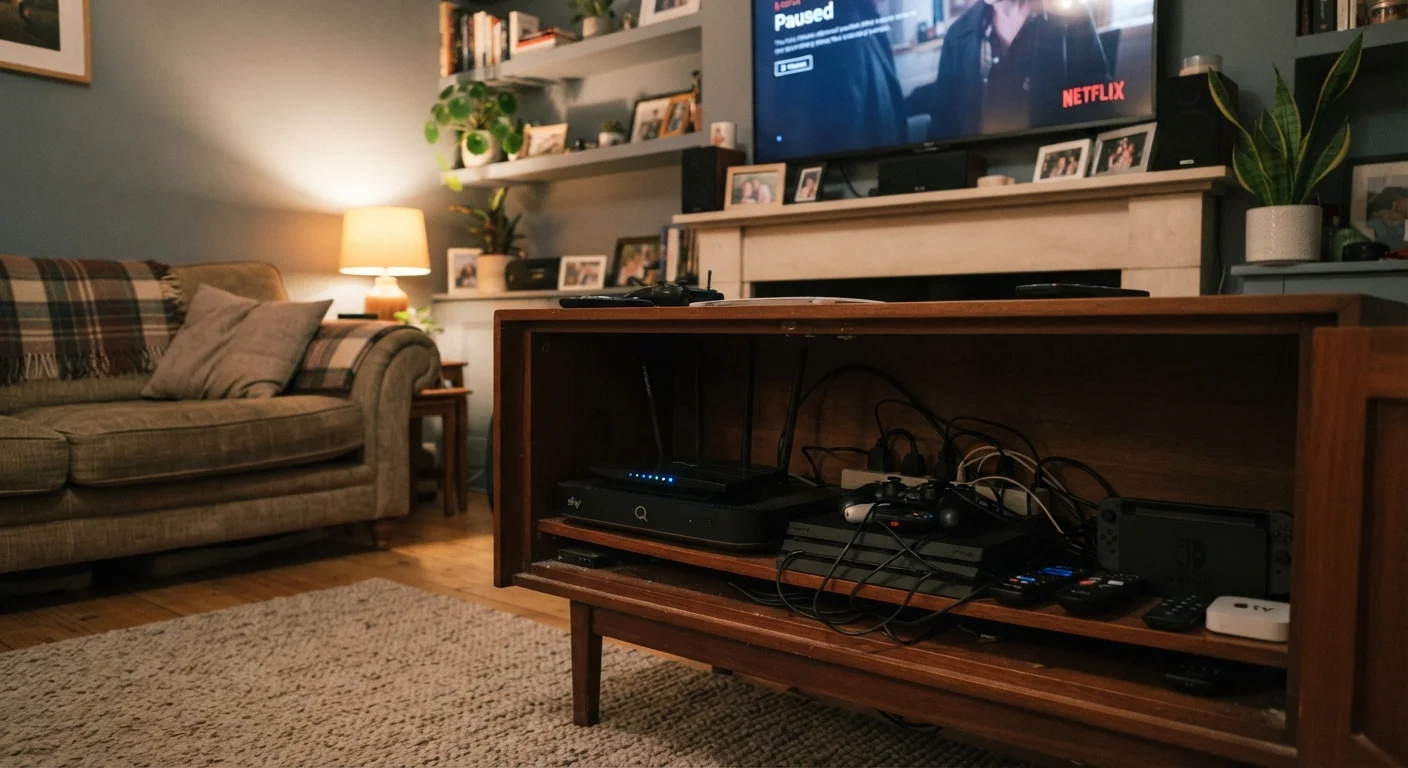
Hiding the router inside a media cabinet, entertainment center, or closet.

Why it happens: Routers look industrial, and many people understandably want to keep them out of sight. Enclosed furniture seems like a tidy solution.
How to avoid: Wood, metal cabinet walls, and glass doors all reduce signal strength. Keep the router out in the open — on a shelf, desk, or wall-mounted bracket — so nothing obstructs the antenna's broadcast. If aesthetics matter, choose a visible shelf rather than an enclosed compartment.
3

Setting the router on the floor or near the ground.

Why it happens: Floor-level power outlets and modem connections make the floor a natural landing spot, particularly in utility areas or along baseboards.
How to avoid: Wi-Fi signals propagate outward and slightly downward from the antenna. Placing the router at chest or waist height — on a bookshelf or desk — gives it a better vantage point to reach devices across rooms and floors. For multi-story homes, a central second-floor location often outperforms any ground-floor spot.
4

Positioning the router near microwave ovens, cordless phones, or baby monitors.

Why it happens: Kitchens and home offices are common spots for routers, but they often share space with appliances that emit radio frequency energy on overlapping bands.
How to avoid: Microwave ovens in particular emit energy in the 2.4 GHz range — the same band many routers use for broader coverage. Keep at least several feet of distance between the router and these devices. Understanding how Wi-Fi bands work can help you recognize which devices in your home are most likely to interfere.
5

Placing the router directly beside or behind a large TV, metal appliance, or fish tank.

Why it happens: Counter space and outlet access often dictate placement by default, putting routers next to whatever else occupies a shelf or entertainment unit.
How to avoid: Metal surfaces reflect and scatter wireless signals rather than letting them pass through. Large water volumes, like aquariums, absorb signals. Position the router where there is clear line-of-sight in as many directions as possible, away from dense or reflective objects.
6

Using a single router in a large or multi-story home without considering coverage limitations.

Why it happens: Many households never reassess their setup after an initial installation, even as their home's layout or connected device count grows.
How to avoid: A single router has a finite range, and walls, floors, and distance compound the signal loss rapidly. If repositioning doesn't resolve dead zones, a range extender or a mesh networking system may be the next logical step. Comparing mesh systems to traditional routers can help you weigh your options based on home size and usage.

Getting the Most From Your Current Setup

Correcting placement errors is a strong starting point, but it works best alongside other foundational habits. Make sure your router's firmware is current — outdated firmware can limit performance independent of position. Common gadget setup mistakes outlines why firmware and initial configuration matter more than most users expect.

Enclosed Spaces Trap Heat and Hurt Performance

Routers generate heat during normal operation, and enclosing them in cabinets or closets can cause them to overheat and throttle performance. Beyond signal obstruction, poor ventilation shortens the device's lifespan. Always ensure the router has open airflow around it — never stack items directly on top of it.

Once placement is optimized, you may still find that certain rooms remain underserved. That's a signal (no pun intended) that your home's layout or size exceeds what a single router can reliably cover. At that point, it's worth understanding your options for extending coverage thoughtfully rather than adding devices haphazardly. You can also explore basic home network security practices to make sure your improved connection isn't left exposed.

Placement Affects Every Device on Your Network

A poorly placed router doesn't just slow down one device — it degrades the experience for every phone, laptop, smart TV, and connected gadget in your home. Before troubleshooting individual devices or calling your internet provider, router position should be the first variable you examine. Signal problems that feel like a service issue are frequently a placement issue.

The goal isn't a perfect signal in every square foot — it's a reliable, usable connection wherever you and your household actually need it. Start with position, then assess whether your setup genuinely needs more.

Tech & Electronics Editorial Team

TargetReads.com | Explore Engaging Reads

Tech & Electronics Editorial Team is the collective byline for our editorial team and contributor network. Articles published under this byline or an editorial pen name are researched, written, and reviewed according to our editorial standards for clarity, consistency, and independence before publication.

Gadgets & DevicesApps & SoftwareInternet & Connectivity
View author profile

The content on this site is for informational purposes only and is not a substitute for professional advice. Always consult a qualified professional for guidance specific to your situation.