
Why Your Wi-Fi Signal Drops in Certain Rooms

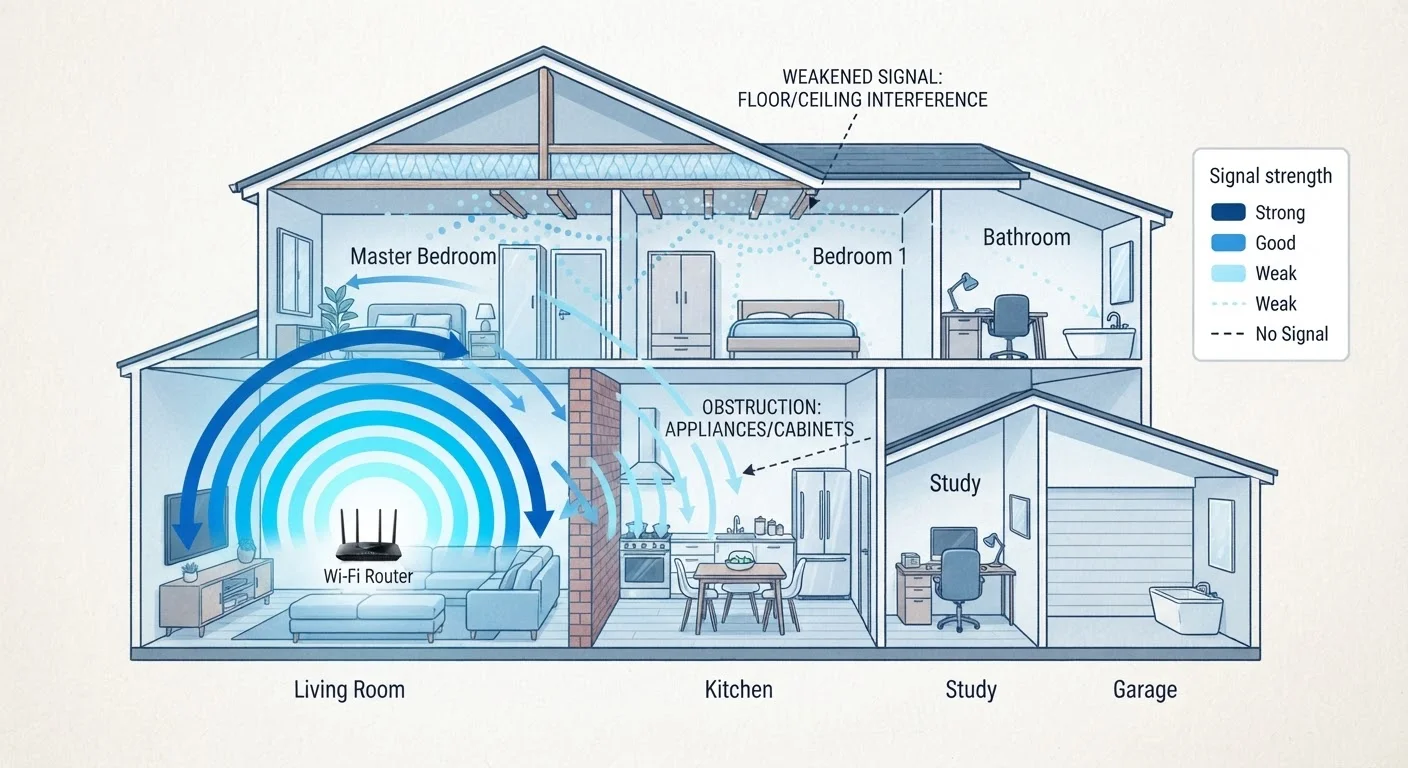
Photo: TargetReads.com | Explore Engaging Reads editorial
Key Takeaways
- Building materials like concrete, brick, and metal absorb or reflect Wi-Fi signals, creating weak spots.
- Distance from the router is one of the most consistent predictors of signal loss.
- Household appliances and neighboring networks can interfere with your Wi-Fi signal.
- Router placement — not just router quality — determines how evenly your home is covered.
- Extending coverage with additional access points or a mesh system can eliminate most dead zones.
How Wi-Fi Signals Actually Travel Through Your Home
Wi-Fi works by transmitting data as radio waves. Those waves radiate outward from your router in all directions — but they don't travel unimpeded. Every material they encounter either absorbs some of their energy, reflects them in a different direction, or slows their spread. The result is that signal strength isn't uniform across your home; it decreases the farther it travels and every time it passes through an obstacle.
Understanding this helps explain why a signal can be strong in your living room and nearly unusable in a bedroom two walls away. It's not a malfunction — it's physics. To learn more about how frequency bands shape this behavior, see our article on the hidden architecture of Wi-Fi signals and channels.
“The single biggest variable in home Wi-Fi performance isn't the router's specifications — it's where that router is placed relative to the walls, floors, and devices it needs to serve.”
— Wi-Fi Alliance Technical Education Team, Industry body for wireless networking standards
The Materials Most Likely to Block Your Signal
Not all walls are equal when it comes to Wi-Fi. The materials used to construct your home have a direct effect on how far your signal can reach:
- Concrete and brick are dense and highly absorptive — they cause the greatest signal loss of any common building material.
- Metal reflects radio waves rather than absorbing them, which can create unpredictable dead zones in rooms with metal doors, ductwork, or reinforced walls.
- Plaster (especially older lathe-and-plaster walls) often contains metal mesh that interferes significantly with signal travel.
- Drywall and wood have relatively minor effects, but multiple layers still add up.
- Water is also a strong absorber — large fish tanks, water heaters, and even the human body can reduce signal strength locally.
~30%
Signal reduction through a single brick wall
Research in RF propagation consistently shows concrete and brick among the most signal-attenuating common building materials, with losses often in the 10–30 dB range depending on thickness.
2x
Approximate range difference: 2.4 GHz vs. 5 GHz
The 2.4 GHz band generally provides roughly double the coverage area of 5 GHz, though 5 GHz delivers faster speeds at shorter ranges.
For a practical look at how your router's position interacts with these materials, see our guide on router placement mistakes that weaken Wi-Fi performance.
Distance, Interference, and Other Contributing Factors
Beyond building materials, several other factors quietly degrade your Wi-Fi signal:
Distance from the Router
Radio waves lose power as they spread outward — a basic principle called free-space path loss. Even with no obstacles, a router's signal weakens noticeably over 30–50 feet, and the effect compounds when walls are added. Rooms at the far end of a home from a router in a corner or closet are especially vulnerable.
Interference from Other Devices
Microwave ovens, cordless phones, and baby monitors often share the 2.4 GHz radio band with many Wi-Fi networks. When these run simultaneously, they compete for the same frequencies. Neighboring Wi-Fi networks — in apartments especially — compound the problem by crowding available channels.
Router Placement
A router tucked in a cabinet, placed on the floor, or positioned at one end of the home will naturally leave parts of the house underserved. Elevation and centrality both improve coverage distribution significantly.
Test Your Signal Room by Room
What You Can Do About Dead Zones
Once you understand why signal weakens, improving coverage becomes more straightforward. There are several practical approaches:
- Reposition your router to a central, elevated location — this alone can meaningfully extend usable coverage.
- Use a wired connection for stationary high-bandwidth devices (smart TVs, gaming consoles, desktop computers) to reduce demand on your wireless network.
- Add a range extender to rebroadcast the signal into a specific dead zone — useful for small gaps in coverage.
- Consider a mesh Wi-Fi system, which uses multiple coordinated nodes to blanket larger or more complex homes with consistent coverage. Our mesh vs. traditional router comparison can help you decide if it's the right fit.
Extenders Create a Separate Network
If your smart home devices are also experiencing connectivity issues, it may be worth understanding how different wireless protocols handle range — our piece on how smart home devices communicate wirelessly covers this in depth.
Frequently Asked Questions
The content on this site is for informational purposes only and is not a substitute for professional advice. Always consult a qualified professional for guidance specific to your situation.