
Mesh Wi-Fi vs. Traditional Routers: Which Setup Fits Your Home

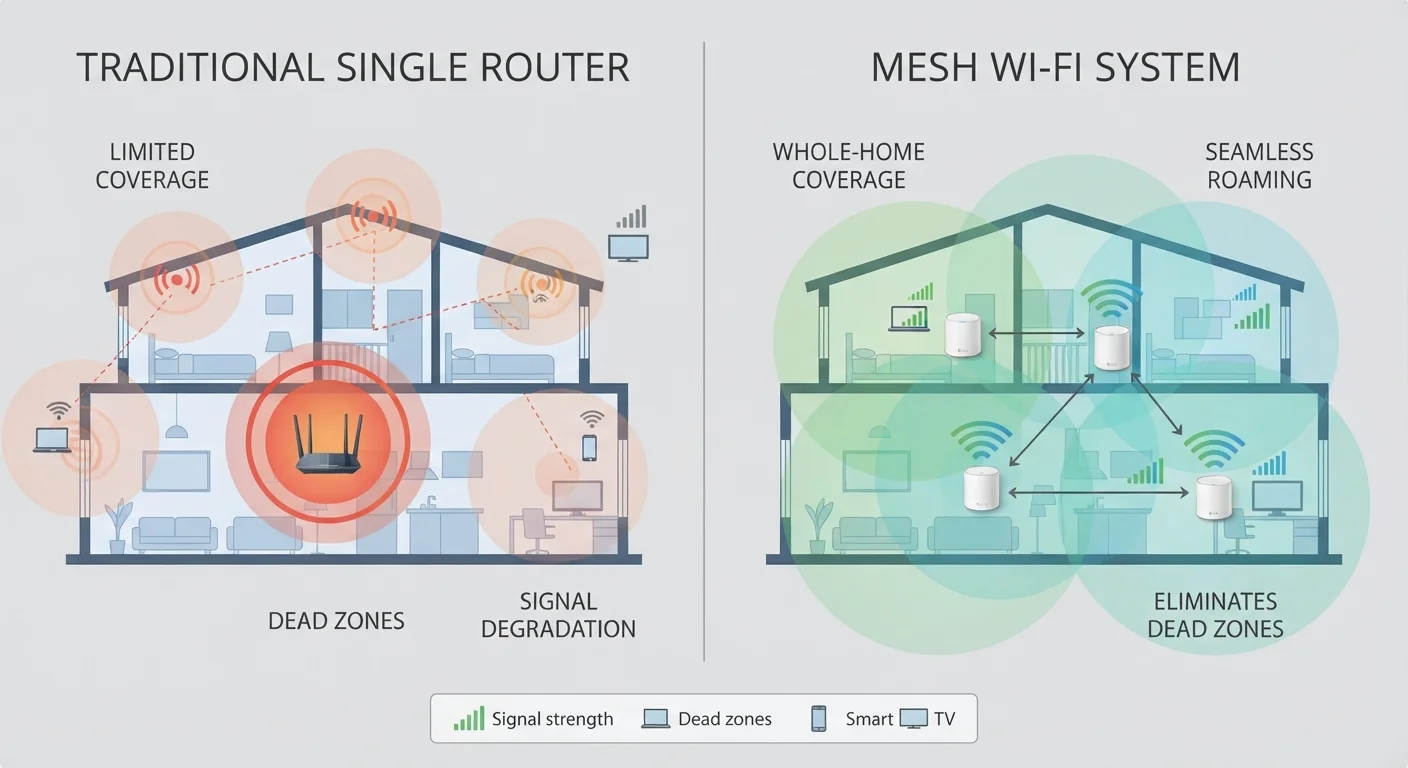
Photo: TargetReads.com | Explore Engaging Reads editorial
Key Takeaways
- Traditional routers work well in smaller homes or apartments with straightforward layouts.
- Mesh systems use multiple nodes to eliminate dead zones across larger or multi-story homes.
- Mesh setups typically cost more upfront but offer easier management and seamless roaming.
- A traditional router combined with a Wi-Fi extender can be a middle-ground option for some homes.
- Your internet plan speed, home size, and device count are the key factors in this decision.
How Each System Works
A traditional router connects directly to your modem and broadcasts a single Wi-Fi signal from one fixed point in your home. Every device connects to that single access point, which means signal strength depends heavily on distance and obstacles like walls or floors. If you want to understand how your internet signal reaches the router in the first place, our guide to home internet connection types explains the differences between DSL, cable, fiber, and other delivery methods.
A mesh Wi-Fi system replaces — or supplements — the single router with a network of multiple nodes or access points placed around your home. These nodes communicate with each other and create one unified network. Your phone or laptop automatically connects to the nearest node as you move through the house, maintaining a stronger, more consistent signal throughout.
The fundamental trade-off is coverage flexibility versus simplicity and cost.
Coverage, Speed, and Reliability
For homes under roughly 1,500 square feet with an open floor plan, a single traditional router placed centrally usually delivers solid coverage. Signal drops happen mainly when devices are far away or separated by thick concrete or brick walls.
Mesh systems handle larger and more complex spaces more effectively. Each node acts as a local access point, so a device in a basement or far bedroom gets a strong signal from a nearby node rather than straining to reach a router at the other end of the house. This reduces the lag and speed drops that frustrate users in larger homes.
| Traditional Router | Mesh Wi-Fi System | |
|---|---|---|
| Typical coverage area | Up to ~1,500 sq ft effectively | 2,000–6,000+ sq ft with multiple nodes |
| Upfront cost | Generally lower | Higher (multiple nodes needed) |
| Setup complexity | Moderate to high | Low (app-guided) |
| Advanced configuration options | Extensive manual controls | Limited, simplified interface |
| Seamless device roaming | No — one fixed access point | Yes — auto-connects to nearest node |
| Automatic firmware updates | Often manual | Usually automatic via app |
| Best for | Small homes, tech-savvy users | Large homes, multi-story layouts |
It's also worth noting that where you place your router matters enormously in either setup. Common router placement mistakes — like putting it inside a cabinet or near thick walls — can significantly weaken your signal regardless of hardware quality.
Setup, Management, and Cost
Traditional routers generally require more manual configuration. Accessing settings typically means entering an IP address in a browser and navigating a technical interface. For users comfortable with networking basics, this offers a high level of control over things like port forwarding, DNS settings, and device prioritisation (Quality of Service, or QoS).
Mesh systems are designed for ease of use. Most rely on a smartphone app that walks users through setup step-by-step and provides ongoing network monitoring without requiring technical knowledge. The trade-off is that advanced manual controls are often limited or abstracted away.
Test Before You Commit to Mesh
On cost, a capable traditional router typically runs less upfront than a mesh system, which requires purchasing at least two or three nodes to be effective. However, a traditional router paired with a Wi-Fi range extender — a separate device that rebroadcasts the signal — can fill some coverage gaps at a lower price point, though extenders create a separate network name and don't offer the seamless roaming of a true mesh setup.
For households managing many smart home gadgets alongside phones and laptops, the unified network approach of mesh can simplify device management considerably. If you're curious about how smart devices communicate over Wi-Fi, this breakdown of wireless protocols covers the underlying differences.
Security and Long-Term Considerations
Both router types carry similar baseline security features: WPA3 encryption (on newer hardware), firewall capabilities, and guest network options. Mesh systems often push firmware updates automatically through their apps, which can help keep security patches current with less user effort. Traditional routers may require the user to check for and apply updates manually.
Either way, maintaining good network security habits matters more than the hardware choice alone. Practical home network security habits can reduce your exposure without requiring deep technical expertise.
If you're starting fresh and unsure how to configure any of these setups, our step-by-step home network setup guide walks through the entire process from modem to password configuration.
In short: evaluate your home's size, your tolerance for technical setup, your device count, and your budget. Those four factors will point clearly toward which approach suits your situation.
The content on this site is for informational purposes only and is not a substitute for professional advice. Always consult a qualified professional for guidance specific to your situation.